Twitter Bold Text: How to Bold and Italicize on X

X has real bold and italic, but only for paid accounts: select text in the composer and press B or I. Everyone else uses Unicode "bold" letters from a generator, copied and pasted into the post. Those count as 2 characters each toward X's 280, nothing extra on Threads or Bluesky, and most screen readers in a 2025 test skipped them. Bold a word or a line, never the whole post.
Twitter bold text comes in two kinds that look alike and behave very differently: X's own formatting, which paid accounts get, and look-alike Unicode letters, which anyone can paste. Here is how to use each and what each costs. We tested the counts on X and Threads, and X's search, on 3 November 2026.
Can you bold text on X natively?
Yes, with a paid plan. Text formatting is an X Premium feature: X's Premium help page lists it from Basic up, and its how-to page says longer posts can carry "rich text (bold and italics)". Since October 2026, new buyers get X Premium benefits with any paid X Subscription plan, from $8 a month, while existing subscribers, legacy Basic ($3) included, keep theirs. Our X Premium guide compares the plans.
When we tested on a paid account on 3 November 2026, selecting a word in the x.com composer brought up Bold and Italic buttons. The letters stayed plain, with formatting on top, so native bold adds nothing to your character count. In the iOS and Android apps, a roboin.io guide from October 2025 says the same buttons sit behind a button with a small and a large A.
One caveat: on 1 October 2024 Elon Musk posted that bold would be "removed from view in the main timeline" and shown only when someone opens the post. We found no later word from X, so check how your post looks from another account before relying on it.
Free accounts don't get these buttons, which is where copy and paste comes in.
How to bold or italicize a tweet without Premium
The workaround uses letters that already exist in Unicode, the text standard. Its Mathematical Alphanumeric Symbols block holds full alphabets in bold, italic, bold italic, script, fraktur, double-struck and monospace, made for maths. Unicode says they are "intended for use only in mathematical or technical notation, and not in nontechnical text." Social media uses them anyway, because a pasted 𝐁 looks bold everywhere with no formatting at all.
You need a generator to type them. Ours is the free Twitter font generator, which runs in the browser with no login; other generators use the same Unicode alphabets.
- Type or paste your post into the box.
- Select the word or line you want to stand out and press the 𝗕 (Bold) button, or Italic, Bold italic, Strikethrough or Underline beside it, or a style from More styles…. Only the selection changes.
- Check the count. The counter shows the post's X weight, what the styling added, and the Threads and Bluesky counts.
- Copy the post and paste it into X, on the web or in the app.
The generator keeps links, @mentions and #hashtags plain on purpose (see why below). Clear formatting turns styled letters back into normal ones if you change your mind.
What bold text costs on X
X does not count every character as 1. Its open-source twitter-text counting rules weigh most Latin, Greek and Cyrillic characters at 1 and everything outside a few ranges at 2. Unicode bold letters sit outside those ranges, so each one costs 2.
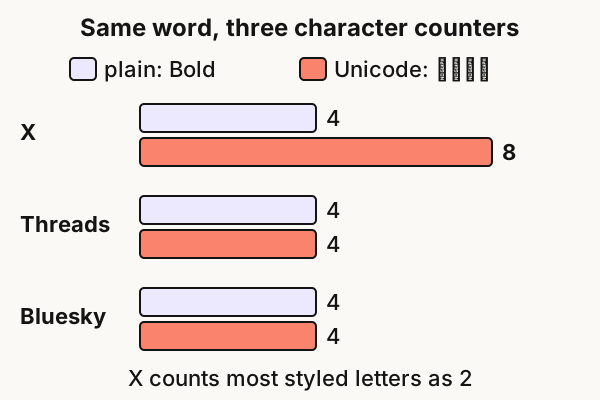
X's own composer agrees: 135 bold letters left "10 characters remaining for a standard post", a count of 270, and 141 went past 280.
| What you type | Counts on X |
|---|---|
| Bold (plain) | 4 |
| 𝐁𝐨𝐥𝐝, 𝘽𝙤𝙡𝙙, 𝓑𝓸𝓵𝓭 (bold, bold italic, script) | 8 |
| B̶o̶l̶d̶ (strikethrough) | 8: a letter plus a stroke mark |
| ʙᴏʟᴅ (small caps) | 6: some of these letters weigh 1 |
| Any link | 23, however long |
| An emoji | 2 |
In practice, bolding a five-letter word adds 5 to your count, and a fully bold post fits 140 letters instead of 280.
Bold text on Threads and Bluesky
The same letters paste into both apps, and both count them more kindly than X.
- Threads allows 500 characters and counts a styled letter as 1. In the Threads composer, 501 bold letters showed one over the limit. Strikethrough and underline cost 2 per letter, because each adds a separate mark: 251 struck-through letters came out 2 over. Meta documents native styling for Threads only in text attachments, the expandable long-text block under a post.
- Bluesky caps a post at 300 graphemes, the characters you see, per its post format definition. A bold letter is 1, and so is a struck-through one. Bluesky has no native bold: its rich text covers only mentions, links and hashtags.
Other networks' limits are in our character limits guide.
Accessibility and search: when not to use it
Unicode bold is a set of maths symbols, and screen readers treat it that way. Adrian Roselli tested fake bold and italic in six screen reader and browser pairs in 2025. NVDA, Narrator and VoiceOver on macOS and iPadOS did not announce the styled text at all. JAWS read each letter one by one, with its case and style. Only TalkBack read it as normal words. For many blind readers, your bold hook is silent or spelled out.
Search held up better than most guides suggest. On X (tested 3 November 2026), a search for plain words found a post whose only matching words were in Unicode bold, a bold search term returned plain posts, and People search found a display name written in styled letters. Most of these letters have an official plain equivalent in Unicode, which is likely why. Small caps have no plain equivalent, so a plain search is unlikely to find them.
What does break is anything X has to recognise:
- @mentions: X usernames are plain letters, numbers and underscores, so a styled handle tags no one.
- Links: a URL in styled letters is just text.
- Hashtags: a styled tag may not join the plain one, so keep tags plain.
Rules for bold text that helps
- Style a word or a line, not the post. One bold phrase guides the eye; a bold paragraph is hard to read and costs double.
- Keep names, mentions, links, hashtags and your key point plain. That way the post still reads aloud correctly.
- Bios: a word or two at most. For what to say, see our X bio ideas and Threads bio ideas.
- Display names: keep your real name plain and put any accent beside it, so screen readers can say who you are.
- In a thread, style the hook at most. Our thread guide covers what the first post has to do.
- Don't expect a reach change. We found no evidence that Unicode letters alone help or hurt how X distributes a post.
When one line should stand out, the font generator styles just that line and shows what it adds to your count.
FAQ
Q: How do you bold on Twitter without Premium?
Write your post in a Unicode font generator, select the word, press Bold, then copy and paste the result into X. The letters are bold-looking Unicode characters, so they show for everyone without any formatting.
Q: Why don't I see a bold button on X?
The Bold and Italic buttons are part of X's paid plans: any X Premium tier, or for new buyers an X Subscription plan from $8 a month. Free accounts don't get them, so Unicode letters are the way to bold without paying.
Q: Does bold text count as more characters on X?
Unicode bold does: most styled letters count as 2, so a bold five-letter word costs 10 instead of 5. X's native bold for paid accounts keeps normal letters and costs nothing extra.
Q: How do I change the font on Twitter?
You can't change the font other people see. X's display settings change text size only for you. To make letters look different for everyone, paste Unicode styles such as script, monospace or double-struck from a generator.
Q: Can bold text get my X account restricted?
We found no evidence that Unicode letters alone restrict an account. They are ordinary characters. The real costs are readability, screen readers and your character count.
Related articles

The Best AI Twitter/X Thread Generators Compared (2026)
Nine AI Twitter thread generators, ranked by what each is genuinely best at — plus how to pick the right one for your stage and budget.
How to Turn an Article Into an X Thread (6-Step Workflow)
Turn a long-form article into an X thread without losing the argument — a 6-step workflow, hook rules, and the thread generator that drafts it.
How to Write an X Thread: Structure, Hooks, Length (2026)
How to write an X thread people finish — hook formulas, the right length, formatting rules and a template you can reuse.